

I have a really really hard time seeing the pale green/pale yellow combination for landing on planets, especially when the planet is also pale. Not colourblind or anything, but it's annoying.
Any chance anyone could tell me how to change that pale green to bright red for example? Or do it for me. Either is fine, I'm used to modding, I've published a number of them for Dungeons of Dredmor for example.
I miss Frontier's navigation screen...
Very minor mod or how to request. (Nav)
-
Kaerius
- Ensign

- Posts: 5
- Joined: Wed Jul 25, 2012 10:19 pm
-
Marvin

- Global Moderator

- Posts: 14373
- Joined: Wed Mar 04, 2009 5:47 am
- Location: Fallon-Reno
Very minor mod or how to request. (Nav)
 Download the Customizing Kit at the main DL page for Mercenary to learn how to mod most of the HUD graphics. Or check some of the other mods ... I sometimes use one with very nice blue-gray boxes which show up quite well in front of any type background.
-
Kaerius
- Ensign
- Posts: 5
- Joined: Wed Jul 25, 2012 10:19 pm
Very minor mod or how to request. (Nav)
Hmm, the thing I complained about does not seem to be moddable, at least according to the customization download.
I'm talking about the navigation map where you set your waypoints. I would like to change the colour of the pale green + sign used to indicate cities on planets, but it doesn't seem to be in there.
Borrowing from the tutorial to start the mercenary quest to show what I'm talking about...
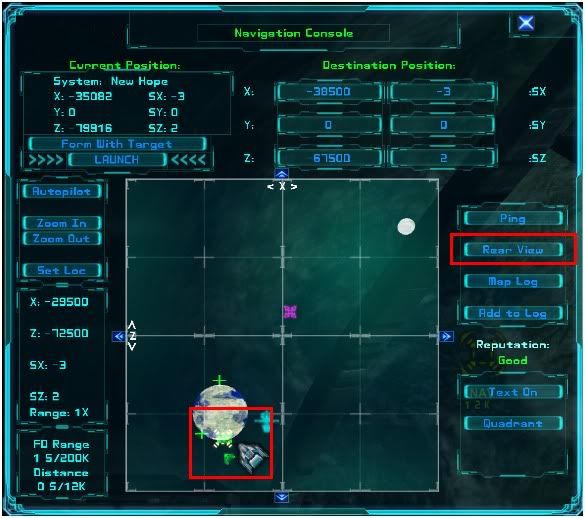
That is really tough to see for fine calibration.
I'm talking about the navigation map where you set your waypoints. I would like to change the colour of the pale green + sign used to indicate cities on planets, but it doesn't seem to be in there.
Borrowing from the tutorial to start the mercenary quest to show what I'm talking about...
That is really tough to see for fine calibration.
-
Marvin
- Global Moderator
- Posts: 14373
- Joined: Wed Mar 04, 2009 5:47 am
- Location: Fallon-Reno
Very minor mod or how to request. (Nav)
 You might be correct about city markers. If they aren't in the HUD section of the Customizing Kit, then it's not likely you can change them.
-
EN4CER
- Lieutenant

- Posts: 186
- Joined: Tue Jul 24, 2012 4:49 pm
- Location: Texas
Very minor mod or how to request. (Nav)
I've seen another nav map mod where they changed the colors of the buttons but not the colors of the icons. I'll be downloading this app tonight to monkey with huds. I doubt I'll see anything you didn't but if I do I'll let you know 

-
Kaerius
- Ensign
- Posts: 5
- Joined: Wed Jul 25, 2012 10:19 pm
Very minor mod or how to request. (Nav)
Well... decided on a minimalist nav map targeting crosshair. The default obstructs too much.

9x9 total size. Instead of about what, about 37x37 for the default?
[file]630[/file]
EDIT: Ok back to the drawing board, that wasn't visible superimposed on the planet starport.
For precise targeting, there's 1 pixel gap in the middle of each side to allow matching up the + sign, and a single pixel dot in the middle.
[Edited on 2012/7/26 by Kaerius]
[Edited on 2012/7/26 by Kaerius]
9x9 total size. Instead of about what, about 37x37 for the default?
[file]630[/file]
EDIT: Ok back to the drawing board, that wasn't visible superimposed on the planet starport.
For precise targeting, there's 1 pixel gap in the middle of each side to allow matching up the + sign, and a single pixel dot in the middle.
[Edited on 2012/7/26 by Kaerius]
[Edited on 2012/7/26 by Kaerius]
-
Marvin
- Global Moderator
- Posts: 14373
- Joined: Wed Mar 04, 2009 5:47 am
- Location: Fallon-Reno
Very minor mod or how to request. (Nav)
For a targeting crosshair on the Nav Map, I use a slightly modded version of the HUD cursor.-
Kaerius
- Ensign
- Posts: 5
- Joined: Wed Jul 25, 2012 10:19 pm
Very minor mod or how to request. (Nav)
My current one is this:

I'll keep refining it until I'm happy with it. They're just so very translucent...
I'll keep refining it until I'm happy with it. They're just so very translucent...